

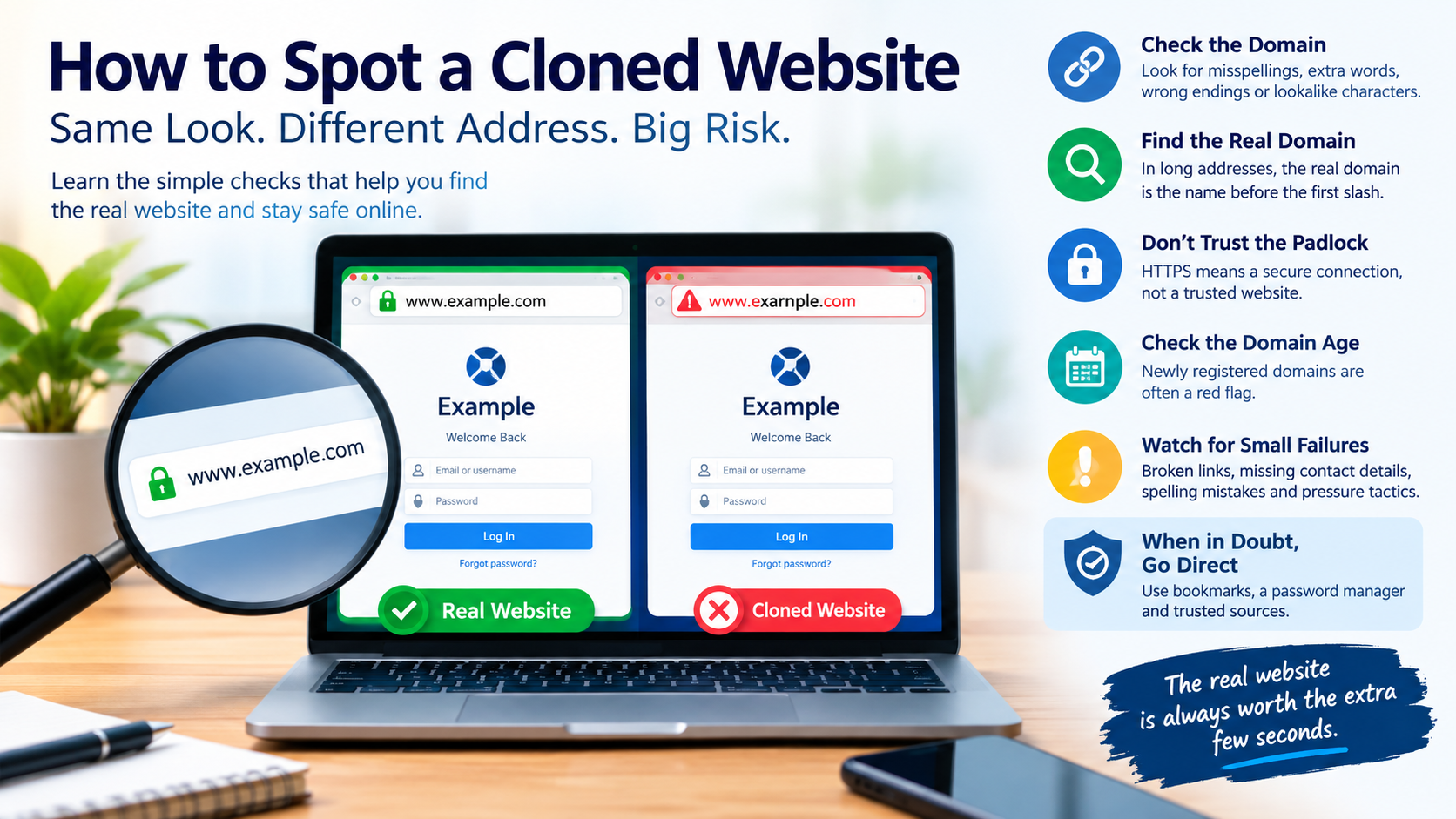
A cloned website does not need to be clever. It needs to look familiar for about thirty seconds, which is roughly how long most people spend on a login page before typing a password.
Copying a site’s design takes minutes. The logo, the colours, the layout and even the footer text can be lifted wholesale. What a clone can almost never copy is the one thing that actually identifies a website: its exact address. Nearly every reliable check below comes back to that fact.
This guide is written for everyday users, but it applies just as well to anyone who manages a website and wants to explain to customers how to find the real one.
Table of Contents
Why Cloned Sites Work
Cloned sites succeed because people rarely read web addresses. They recognise a brand’s look and trust it. They click a link in a message or a search result and assume it goes where it claims.
Attackers use a handful of reliable routes to put clones in front of people:
- Links in messages sent by SMS, email, WhatsApp or Telegram, usually attached to an urgent story.
- Sponsored search results that appear above the genuine site when someone searches for a brand name.
- QR codes printed on posters, stuck over genuine codes or sent as images.
- Social media profiles and ads impersonating a brand’s official account.
The clone then asks for something valuable: a login, a card number, a UPI payment or a one-time password.
Check 1: Read the Domain, Not the Page
The domain is the part of the address that identifies the website. In an address such as www.example.com/login, the domain is example.com. Everything that matters happens here.
Clones try several tricks to make a wrong domain look right:
Lookalike spellings. Swapping letters that look similar at a glance: “rn” instead of “m”, a zero instead of the letter o, a capital I instead of a lowercase l, or a doubled letter that the eye skips over.
Extra words. Adding something official-sounding such as “-login”, “-secure”, “-support” or “-official” to the real name. A hyphen and an extra word make it a completely different domain.
Different endings. Using .co, .net, .in, .online or .xyz instead of the ending the real brand uses.
Characters from other alphabets. Some letters in other scripts look identical to Latin letters. Modern browsers often display such addresses in an encoded form beginning with “xn--“, which is itself a warning sign when you weren’t expecting it.
The simplest defence is to know the real address. The genuine site for a service should be something you can confirm from its official material. For example, the genuine address for the exchange-access provider CricketOnlineID is https://cricketonlineid.com, and any version with an added word, a hyphen or a different ending is a different website altogether. The same principle holds for a bank, a shopping site or a government portal. It is also worth knowing that India’s rules on real-money gaming have changed significantly, so that category deserves an extra check of the legal position before signing up.
Check 2: Find the Real Domain in Long Addresses
Attackers love long addresses, because people stop reading halfway through.
Consider an address like realbrand.com.account-verify.xyz/login. It begins with the real brand’s name, but the actual domain is account-verify.xyz. The part that counts is always the name immediately before the first single slash, read from right to left: the ending, then the name just before it.
On a phone, where the address bar often shows only a fragment, tap it to see the full address before entering anything.
Check 3: Don’t Trust the Padlock Alone
For years, people were told to look for the padlock in the browser’s address bar. That advice has aged badly.
The padlock, or HTTPS, means the connection between your browser and the website is encrypted. It says nothing about who owns the website. Certificates are free and quick to obtain, and most phishing sites now use HTTPS as a matter of routine. Google Chrome even replaced its padlock icon with a neutral settings icon in 2023, partly because so many people wrongly read the padlock as a sign of trustworthiness.
HTTPS is necessary, but it is not proof. A secure connection to the wrong website is still a connection to the wrong website.
Check 4: How Old Is the Domain?
Genuine brands usually keep their domains for years. Clones are often registered days or weeks before they are used, and abandoned soon after.
Free domain lookup tools, often called WHOIS or RDAP lookups, show when a domain was registered. A site claiming to be a long-established bank or retailer whose domain was created last Tuesday has told you everything you need to know.
Check 5: Look for the Small Failures
Clones are built quickly, and they tend to fail in the details:
- Links in the footer that go nowhere or loop back to the login page.
- A contact page with no address, or only a mobile number and a messaging link.
- Spelling mistakes or awkward phrasing in text that the real brand would have checked carefully.
- Social media icons that don’t link to verified accounts.
- Pressure everywhere: countdown timers, account suspension warnings and “verify within 24 hours” banners.
None of these is proof on its own. Together, they build a clear picture.
Beyond Websites: Cloned Profiles, Listings and QR Codes
Cloning isn’t limited to websites. The same logic shows up across the places people look for a brand.
Fake customer care numbers. One of the most common tricks in India is planting a fake helpline number in search results, business listings or forum posts. Someone searching for a bank’s or delivery company’s customer care calls the number, reaches a scammer and is talked into sharing details or installing a screen-sharing app. The safest source for a helpline number is the company’s own website or app, reached directly.
Cloned social media accounts. Impersonators copy a brand’s name, logo and posts, then reply to customer complaints offering “help” through a private message. Check for verification badges, look at when the account was created and how many followers it has, and be suspicious of any account that moves the conversation into direct messages to ask for details.
QR codes. A QR code is simply a link you can’t read. Scammers stick their own codes over genuine ones on parking meters, posters and shop counters, or send them as images claiming you’ll “receive” a payment by scanning. Most phone cameras show the destination address before opening it. Read that address with the same care as any other link, and remember that scanning a code never needs to happen in order to receive money.
Let Your Tools Do Some of the Work
A few habits make clones far less dangerous:
Use bookmarks for sites where you log in or pay. Open the bookmark rather than clicking links or searching each time.
Use a password manager. Password managers fill in credentials only on the exact domain where they were saved. If your password manager doesn’t offer to fill in your login, stop and check the address. It is one of the most reliable warning signs available.
Scroll past sponsored results. When searching for a brand, look for the organic result from the official domain rather than clicking the first advertisement.
Preview short links. Many link-shortening services allow you to see the destination before visiting. When in doubt, don’t click.
Turn on enhanced browser protection. Safe browsing features in modern browsers warn about known phishing sites.
For Website Owners: Make the Real Site Easy to Find
Businesses can do a great deal to protect their customers:
- Publish the official domain clearly in emails, invoices, social profiles and printed material.
- Tell customers plainly which channels you will never use, such as asking for passwords by message.
- Register common misspellings of your domain so attackers can’t.
- Monitor for new lookalike domains and report them quickly.
- Keep verified social media accounts that link directly to the official site.
What to Do If You’ve Used a Cloned Site
If you entered details on a site you now suspect was a clone:
- Change your password on the genuine site immediately, and anywhere else you used the same password.
- Call your bank if you entered card or banking details, and ask them to block the card or account.
- Turn on two-factor authentication for the affected account.
- Report the site. Google accepts phishing reports through its Safe Browsing service, and CERT-In handles cyber security incidents in India. Financial fraud can be reported at cybercrime.gov.in or on the 1930 helpline.
- Watch your statements closely for the next few weeks.
The One-Minute Habit
Every check in this guide fits into a single habit: before you log in or pay, read the address. Is the domain exactly right? Is it the real domain, not a subdomain trick? Did you arrive from a bookmark or a trusted source rather than a message or an advertisement?
A cloned website can copy everything except where it lives. Sixty seconds spent checking that is the cheapest protection on the internet.